“Who owns the fish” in Alloy

Hacker News linked to a logic puzzle with the following constraints:

There are five houses in five different colors starting from left to right. In each house lives a person of a different nationality. These owners all drink a certain type of beverage, smoke a certain brand of cigarette and keep a certain type of pet. No two owners have the same pet, smoke the same brand or drink the same beverage. The question is: WHO OWNS THE FISH??? Hints:

  1. The Brit lives in the red house
  2. The Swede keeps dogs as pets
  3. The Dane drinks tea
  4. The green house is on the left of the white house
  5. The green house’s owner drinks coffee
  6. The person who smokes Pall Mall rears birds
  7. The owner of the yellow house smokes Dunhill
  8. The man living in the centre house drinks milk
  9. The Norwegian lives in the first house
  10. The person who smokes Marlboro lives next to the one who keeps cats
  11. The person who keeps horses lives next to the person who smokes Dunhill
  12. The person who smokes Winfield drinks beer
  13. The German smokes Rothmans
  14. The Norwegian lives next to the blue house
  15. The person who smokes Marlboro has a neighbor who drinks water

Alloy is very well-suited to solving this type of problem, so I gave it a go. Here’s what my Alloy model looks like:

open util/ordering[House]

sig House {
 color: one Color
}

abstract sig Person {
 occupies: one House,
 drinks: one Beverage,
 smokes: one Cigarette,
 keeps: one Pet
}
one sig Brit, Swede, Dane, Norwegian, German extends Person {}

abstract sig Color {}
one sig White, Yellow, Blue, Red, Green extends Color {}

abstract sig Beverage {}
one sig Tea, Coffee, Milk, Beer, Water extends Beverage {}

abstract sig Pet {}
one sig Birds, Cats, Dogs, Horses, Fish extends Pet {}

abstract sig Cigarette {}
one sig PallMall, Dunhill, Marlboro, Winfield, Rothmans extends Cigarette {}

fact allRelationsAreOneToOne {
 color.~color in iden
 occupies.~occupies in iden
 drinks.~drinks in iden
 smokes.~smokes in iden
 keeps.~keeps in iden
}

pred problemConstraints {

 // The Brit lives in the red house
 Red in Brit.occupies.color

 //The Swede keeps dogs as pets
 Dogs in Swede.keeps

 // The Dane drinks tea
 Tea in Dane.drinks

 // The green house is on the left of the white house
 Green in prev[color.White].color

 // The green house's owner drinks coffee
 Coffee in (occupies.(color.Green)).drinks

 // The person who smokes Pall Mall rears birds
 Birds in (smokes.PallMall).keeps

 // The owner of the yellow house smokes Dunhill
 Dunhill in (occupies.(color.Yellow)).smokes

 // The man living in the centre house drinks milk
 (drinks.Milk).occupies in first[].next.next

 // The Norwegian lives in the first house
 Norwegian in occupies.first[]

 // The person who smokes Marlboro lives next to the one who keeps cats
 (smokes.Marlboro).occupies in (keeps.Cats).occupies.(next + prev)

 // The person who keeps horses lives next to the person who smokes Dunhill
 (keeps.Horses).occupies in (smokes.Dunhill).occupies.(next + prev)

 // The person who smokes Winfield drinks beer
 Beer in (smokes.Winfield).drinks

 // The German smokes Rothmans
 German in smokes.Rothmans

 // The Norwegian lives next to the blue house
 Blue in Norwegian.occupies.(next+prev).color

 // The person who smokes Marlboro has a neigbor who drinks water
 (drinks.Water).occupies in (smokes.Marlboro).occupies.(next+prev)

}

run problemConstraints for exactly 5 House

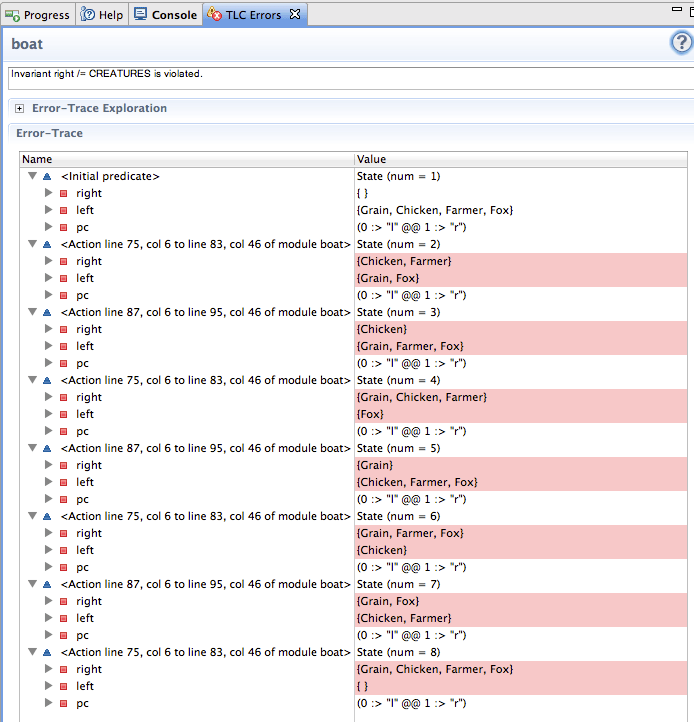
Alloy’s “Magic Layout” did a surprisingly good job at displaying the results. I had to manually rearrange the output so the houses would be displayed in the correct order, but otherwise no fiddling was required. Here’s what it looks like:

alloy-fish

I also put it up on Github.

Results from estimating confidence intervals

A few weeks ago, I decided to estimate 90% confidence intervals for each day that I worked on developing a feature.

Here are some results over 10 days from when I started estimating until when the feature was deployed into production.

Effort estimates

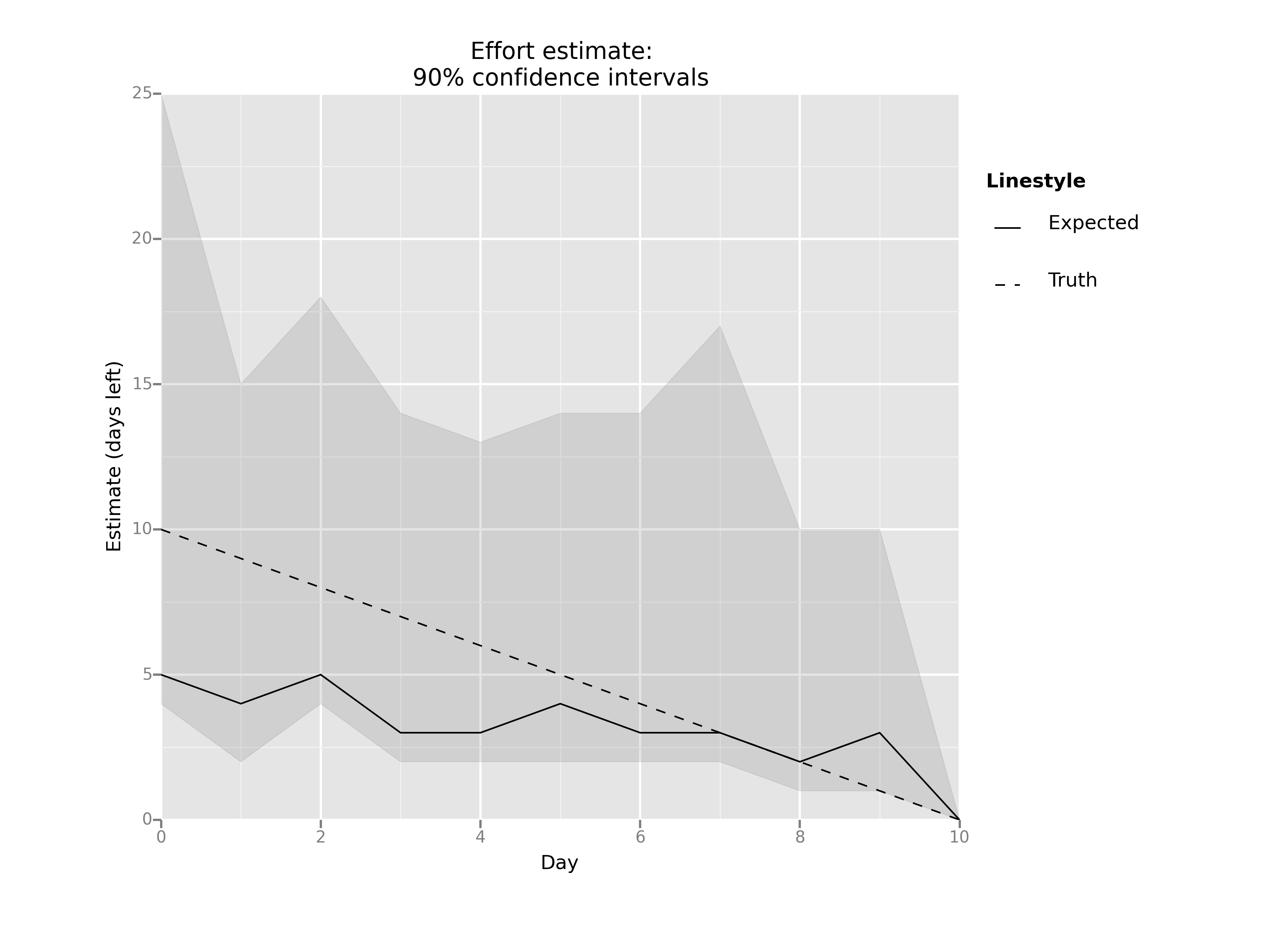
The dashed line is the “truth”: it’s what my estimate would have been if I had estimated perfectly each day. The shaded region represents my 90% confidence estimate: I was 90% confident that the amount of time left fell into that region. The solid line is the traditional pointwise effort estimate: it was my best guess as to how many days I had left before the feature would be complete.

If we subtract out the “truth” from the other lines, we can see the error in my estimate for each day:

Error in estimate

Some observations:

  • The 90% confidence interval always included the true value, which gives me hope that this an effective estimation approach.
  • My pointwise estimate underestimated the true time remaining for 9 out of 10 days.
  • My first pointwise estimate started off by a factor of two (estimate of 5 days versus an actual of 10 days), and got steadily better over time.

I generated these plots using IPython and the ggplot library. You can see my IPython notebook on my website with details on how these plots were made.

Reading academic papers on a Kindle Paperwhite

I recently discovered a great little tool called K2pdfopt for reformatting PDFs such as two-column academic papers so that they are easy to read on a Kindle. (On a related note, it’s ESEM paper review season).

To format for my Kindle Paperwhite, I invoke it like this:

k2pdfopt filename.pdf -dev kpw


Then I just copy the reformatted PDF file to my Kindle. Works great.

Edit: The author of k2pdfopt, William Menninger, informed me that the "-fc" flag is on by default (no need to specify it), and that you can set "-dev kpw" in the K2PDFOPT environment variable so it doesn’t have to be set on the command line each time.

Tackling Hofstadter’s Law with confidence intervals

Hofstadter’s Law: It always takes longer than you expect, even when you take into account Hofstadter’s Law.

One of the frustrating things about developing software is that tasks always seem to take longer to complete than you expected before you started. Somehow, we’re always almost done on whatever feature we’re working on.

I’ve also long been a fan of the idea of using 90% confidence intervals instead of point estimates. Hubbard discusses this in his wonderful book How to measure anything. Instead of trying to pick how long a task will take (e.g., 4 days), you try to predict a range where you are 90% certain that the time will fall within that range (e.g., 3 – 15 days).

I’m going to put my money where my mouth is and try doing confidence interval estimates when working on a feature or bug. I ginned up a quick form using Google Forms and my aim is to fill it in each day, and then evaluate how well I can come up with 90% estimates.

Effort estimation

People don’t understand computer science

From a recent Daily Beast essay.

Certainly, it is more practical to study engineering than philosophy. The country has a high demand for engineers. America also needs doctors, computer programmers, chemists, mechanics, and janitors. Does America not also need art historians, artists, philosophers, novelists, journalists, and well-rounded, thoughtful, and intellectually independent adults?

Gore Vidal defined an intellectual as “someone who can deal with abstractions.” Does the mediocrity of the job market mean that America no longer needs people who deal with abstractions? Only someone already painfully unable to deal with abstraction would draw such a suicidal conclusion.

I’m pretty sure that a computer programmer is someone who can deal with abstractions.

Adopt an op

Here’s a modest proposal: a program to pair up individual OpenStack developers with OpenStack operators to encourage better information flow from ops to devs.

Heres’s how it might work. Operators with production OpenStack deployments would indicate that they would be willing to occasionally host a developer. The participating OpenStack developer would travel to the operator’s site for, say, a day or two, and shadow the operator. The dev would observe things like the kinds of maintenance tasks the op was doing, the kinds of tools they were using to do so, and so on.

After the visit was complete, the dev would write up and publish a report about what they learned, focusing in particular on observed pain points and any surprises that the dev encountered about what the operator did and how they did it. Finally, the dev would submit any relevant usability or other bugs to the relevant projects.

You could call it “Adopt an Op”. Although “Adopt a Dev” is probably more accurate, I think that the emphasis should be on the devs coming to the ops.

Up and running on Rackspace

Rackspace is now running a developer discount, so I thought I’d give them a try. Once I signed up for the account and got my credentials, here’s how I got up and running with the command-line tools. I got this info from Rackspace’s Getting Started guide.

First, install the OpenStack Compute client with rackspace extensions.

sudo pip install rackspace-novaclient

Next, create your openrc file, which will contain environment variables that the client will use to authenticate you against the Rackspace cloud. You’ll need the following information

  1. A valid region. When you’re logged in to your account, you can see the region names. In the U.S., they are:
    • DFW (Dallas)
    • IAD (Northern Virginia)
    • ORD (Chicago)
  2. Your username (you picked this when you created your account)

  3. Your account number (appears in parentheses next to your username when you are logged in to the control panel at http://mycloud.rackspace.com)

  4. Your API key (click on your username in the control panel, then choose “Account Settings”, then “API Key: Show”)

Your openrc file should then look like this (here I’m using IAD as my region):

export OS_AUTH_URL=https://identity.api.rackspacecloud.com/v2.0/
export OS_AUTH_SYSTEM=rackspace
export OS_REGION_NAME=IAD
export OS_USERNAME=<your username>
export OS_TENANT_NAME=<your account number>
export NOVA_RAX_AUTH=1
export OS_PASSWORD=<your API key>
export OS_PROJECT_ID=<your account number>
export OS_NO_CACHE=1

Finally, source your openrc file and start interacting with the cloud. Here’s how I added my public key and booted an Ubuntu 13.04 server:

$ source openrc
$ nova keypair-add lorin --pub-key ~/.ssh/id_rsa.pub
$ nova boot --flavor 2 --image 1bbc5e56-ca2c-40a5-94b8-aa44822c3947 --key_name lorin raring
(wait a while)
$ nova list
+--------------------------------------+--------+--------+-------------------------------------------------------------------------------------+
| ID                                   | Name   | Status | Networks                                                                            |
+--------------------------------------+--------+--------+-------------------------------------------------------------------------------------+
| 7d432f76-491f-4245-b55c-2b15c2878ebb | raring | ACTIVE | public=2001:4802:7800:0001:f3bb:d4fc:ff20:06ab, 162.209.98.198; private=10.176.6.21 |
+--------------------------------------+--------+--------+--------------------------------------------------------------------- 

There were a couple of things that caught me by surprise.

First, nova console-log returns an error:

$ nova console-log raring
ERROR: There is no such action: os-getConsoleOutput (HTTP 400) (Request-ID: req-5ad0092b-6ff1-4233-b6aa-fc0920d42671)

Second, I had to ssh as root to the ubuntu instance, not as the ubuntu user. In fact, the Ubuntu 13.04 image I booted doesn’t seem to have cloud-init installed, which surprised me. I’m not sure how the image is pulling my public key from the metadata service.

EDIT: I can’t reach the metadata service from the instance, so I assume that there is no metadata service running, and that they are injecting the key directly into the filesystem.

Automated DevStack install inside of VirtualBox with Vagrant

If you’re interested in trying out DevStack, I wrote up some scripts for automatically deploying DevStack inside of a VirtualBox virtual machine using Vagrant: devstack-vm.

Assuming you have the prereqs installed, it’s just:

$ git clone https://github.com/lorin/devstack-vm
$ cd devstack-vm
$ chmod 0600 id_vagrant
$ vagrant up

In a few minutes, you’ll have a running version of DevStack, configured with Neutron. You can even reach your instances with floating IPs without having to ssh to the VirtualBox VM first. If you want to automatically boot a Cirros instance and attach a floating IP, just run the included Python script which uses the OpenStack Python bindings:

$ ./boot-cirros.py

Edit: Added a line to chmod the private key